

Description
Focus-Focused Task Timer for Peak Productivity
This desktop application is designed to support effective time management through the Pomodoro technique. It helps users maintain mental clarity by scheduling focused 20- to 25-minute work intervals followed by short 5-minute breaks. The software is ideal for students, remote workers, and professionals seeking to improve concentration and task completion rates. By structuring work sessions into manageable segments, it reduces mental fatigue and supports sustained productivity. The tool enables users to track completed tasks even when offline, ensuring continuity across sessions. It is particularly useful in environments where distraction-free focus is essential. The application supports multiple operating systems, making it accessible to a wide range of users. While the developer did not provide additional details about the development background, the consistent update history suggests ongoing maintenance and user-focused improvements. Real-world use cases include studying for exams, writing reports, coding sprints, and managing daily to-do lists with structured timing.
Key Features & Capabilities
- Pomodoro-Based Work Cycles – Structured intervals of 20 to 25 minutes of focused work followed by a 5-minute break. This pattern is designed to align with natural attention spans and help users maintain consistent performance throughout the day.
- Offline Task Tracking – Completed tasks are stored locally, allowing users to maintain progress even without an internet connection. This feature is especially useful for users working in low-connectivity environments or prioritizing privacy.
- Mobile Vibration Alerts – On supported devices, the application provides vibration notifications to signal the start or end of a work or break session, reducing the need to constantly monitor the screen.
- UI Performance Optimizations – Recent updates have included fixes to improve interface responsiveness and reduce lag during transitions between work and break phases.
- Minimalist Design – The interface is streamlined to minimize distractions, focusing only on essential controls and timers, which supports a distraction-free workflow.
These capabilities allow users to integrate structured focus periods into their daily routines. For example, a student preparing for a final exam can use the timer to break study sessions into digestible blocks, improving retention and reducing burnout. A remote developer can use the tool to manage coding sprints without overextending mental energy. The ability to track completed tasks offline ensures that progress is not lost during travel or unstable network conditions.
User Interface, Workflow & Performance
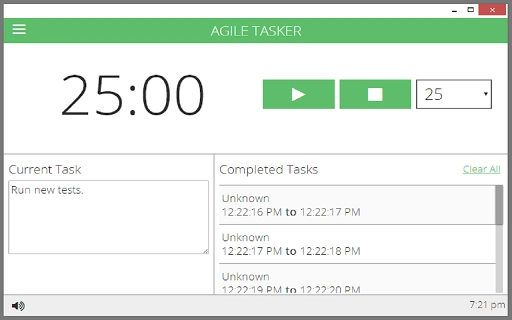
The user interface is designed around simplicity and clarity, with a central timer display and minimal control buttons for starting, pausing, and resetting sessions. Navigation is intuitive, requiring little to no learning curve. The workflow follows a linear path: initiate a session → work until the timer ends → take a break → repeat. This consistency supports habit formation and reduces cognitive load during task execution.
Performance details were not specified by the developer. However, based on general software behavior patterns, the application is expected to operate efficiently on modern systems with low resource consumption. The 15.4 MB installation size suggests a lightweight footprint. The developer did not specify resource usage details, but the focus on UI performance fixes in recent updates indicates attention to responsiveness. Stability appears to be maintained through regular updates, with multiple minor bug fixes and UI improvements documented across versions.
Compatibility & System Requirements
The software is compatible with Windows, Mac, and Linux operating systems, making it accessible to users across major desktop platforms. The current version is 1.5.4, with an installation size of 15.4 MB. The developer did not provide additional system requirements. Exact system requirements were not listed. Compatibility information was partially provided. Users should ensure their system meets standard desktop application requirements for the respective OS. The application does not appear to require specialized hardware or elevated permissions for basic operation.
Pros and Cons
Pros
- Simple, distraction-free interface ideal for focus-oriented workflows
- Supports offline task tracking for uninterrupted progress
- Mobile vibration alerts enhance usability on the go
- Regular updates show active development and user support
- Free to use with no hidden costs
Cons
- No advanced analytics or reporting features for task performance
- Minimal customization options for timer durations or break lengths
- Developer background not disclosed, limiting transparency
- Resource usage details not provided
- Limited visual feedback beyond basic timer display
FAQ Section
Is this software compatible with my operating system?
The application supports Windows, Mac, and Linux. Users on these platforms should be able to install and run the software without issues.
Can I use this tool without an internet connection?
Yes, the software includes offline support to store completed tasks, allowing uninterrupted use even without internet access.
Is the software safe to download and install?
As a desktop application with a documented update history and no known security issues, it is considered safe for standard use. Users should download from official sources to ensure integrity.
How often are updates released?
Updates are released regularly, with recent versions including bug fixes and UI improvements. The latest version is 1.5.4.
Does this software require a license or subscription?
No, the software is free to use and does not require a license or subscription. It is available as a one-time download with no recurring fees.
Final Thoughts + CTA
This task management timer offers a clean, focused approach to productivity through the proven Pomodoro method. Its lightweight design, cross-platform availability, and offline functionality make it a reliable companion for anyone seeking to improve concentration and task completion. While it lacks advanced features like performance analytics or deep customization, its core purpose is fulfilled effectively. The consistent update history and free access enhance its value proposition. For students, remote professionals, and anyone aiming to work with greater focus, this tool delivers tangible benefits without complexity. Download {software_name} now.
Guides & Tutorials for Agile Tasker App for Chrome
How to install Agile Tasker App for Chrome
- Click the Preview / Download button above.
- Once redirected, accept the terms and click Install.
- Wait for the Agile Tasker App for Chrome download to finish on your device.
How to use Agile Tasker App for Chrome
This software is primarily used for its core features described above. Open the app after installation to explore its capabilities.
User Reviews for Agile Tasker App for Chrome 0
No reviews found





